Drawing systems and processes
Keeping diagrams useful
A whiteboard drawing can rely on the people standing beside it. Someone can point to a line and explain that it is a proposal. Someone else can remember which application the word “service” refers to. Once the picture travels into a document, those explanations have to travel with it.
Keeping a diagram useful begins with deciding what is worth preserving. Some drawings help a group think for half an hour and have finished their job. Others explain a decision that colleagues will need to revisit. A few describe a system closely enough that changes to that system should trigger a review of the picture. Giving all three the same permanent status makes a documentation collection harder to trust.
The repair-service examples in this collection let us follow that decision. We have a software view, a process, an interaction, a domain model and a lifecycle. They describe related parts of an invented service. We will compare their claims, decide what to retain, and give the maintained views enough context for someone who missed the meeting.
Choose what the next reader needs
Before copying the board into a drawing tool, write one sentence about its future use. “Helps support engineers find the owner of a failed notification” suggests a different document from “Records why we chose to send notifications after accepting a request.” The first needs current components and ownership. The second needs the decision, alternatives and conditions under which it should be reconsidered.
Preserve the rough source when it contains useful evidence of the discussion. Give it a date and a label such as “Workshop sketch; includes unresolved claims”. Then produce a smaller agreed view if the conversation reached one. The photograph and the agreed drawing can coexist, but readers should be able to tell which one they are expected to rely on.
A temporary drawing can be discarded after its useful findings are captured. For example, a rearrangement exercise may teach the group that the notification worker reads the database. Once that relationship is recorded in the maintained architecture view, three intermediate layouts need not become three official diagrams.
A decision record should explain the consequence of a drawing choice where it matters. “We separated request acceptance from notification delivery so a slow provider does not hold the customer’s request open” gives the sequence diagram a reason to exist. It also raises a responsibility: failed notification work now needs a way to be noticed and handled. The drawing should lead into that discussion rather than present separation as a free improvement.
Select a tool by the work it must support
Different editing methods make different changes cheap. Choose for the people who will maintain the view, the precision it needs, and the places it will be read.
| Working method | Useful when | Work to account for |
|---|---|---|
| Physical board or shared freehand canvas | People are discovering terms and relationships together | Capture the outcome, explain uncertain marks, and prepare readable exports |
| Manual diagram editor | Position, grouping and annotated comparisons carry much of the explanation | Keep connectors attached during moves and retain an editable source |
| Text-based diagrams, including Mermaid | Small diagrams belong beside code and benefit from text review | Inspect rendered changes; short source can still create a wide or awkward layout |
| Process modelling tool | Teams maintain activities, responsibilities and model details together | Agree the modelling conventions and distinguish documented work from executable automation |
| Architecture model with generated views | Several diagrams must share the same named elements and relationships | Maintain the underlying model and deliberately select what each view includes |
Mermaid is a practical option for the sequence examples. Its introduction describes the text-to-diagram approach. A small source change can be reviewed with the surrounding documentation. Keep the renderer version used by your documentation build explicit when reproducible output matters, because syntax support and layout behaviour can change between versions.
A manual editor is often more comfortable for a whiteboard drawing whose explanation depends on exact placement. Save its editable representation along with the exported image. draw.io, for example, documents native diagram files and image exports that can include diagram data in its format guide. Do not assume an arbitrary PNG or SVG from another tool contains recoverable editing information.
IBM Blueworks Live belongs to a process modelling workflow. Its usefulness here is the progression from discovery into activities, roles and process logic, taught in Processes and swimlanes. A diagram’s presence in a modelling tool does not by itself make it a deployed workflow. Likewise, generating a picture from architecture data does not make its inputs accurate.
Do not convert every sketch into Mermaid simply to put it in version control. A hand-drawn image and its explanatory Markdown can also be versioned. The useful comparison is the work required to make the next likely correction, not whether the file looks like code.
Review meaning before appearance
Ask a reader who was absent from the meeting to explain the drawing. Give them the title, key and surrounding explanation they would normally receive, then listen before supplying missing context. If they read the API-to-database arrow as data flowing toward the API, find out what invited that interpretation. The direction, label or chosen view may need repair.
Then walk a concrete case through it. For request R17, locate the customer submission, stored request, notification job, worker and provider. Ask what the picture says about email completion. An architecture view can show the dependency without showing when an email is sent. A sequence that ends at “provider accepted request” does not establish that the customer received or read the email. Write the boundary of the claim where the reader needs it.
Follow an alternative case too. If the provider request times out, identify what is known, what remains uncertain, and where the next action is described. A drawing may deliberately stop before recovery logic, but a document claiming to explain notification recovery cannot leave that step to the reader’s imagination.
The C4 review checklist is a useful source of questions about titles, scope, notation and relationships. Apply those questions to the view’s purpose. A meeting sketch does not need a full inventory of implementation technologies to answer who owns a handoff.
Compare the views without forcing them to look alike
Different views can omit different things. A domain model need not contain the notification worker because it is describing business concepts. A container diagram can show one Repair API while a deployment diagram shows two running instances. Those are compatible choices when the distinction is explained.
A contradiction is different: two drawings make incompatible claims about the same case. Consider this deliberately incomplete lifecycle beside the agreed process.
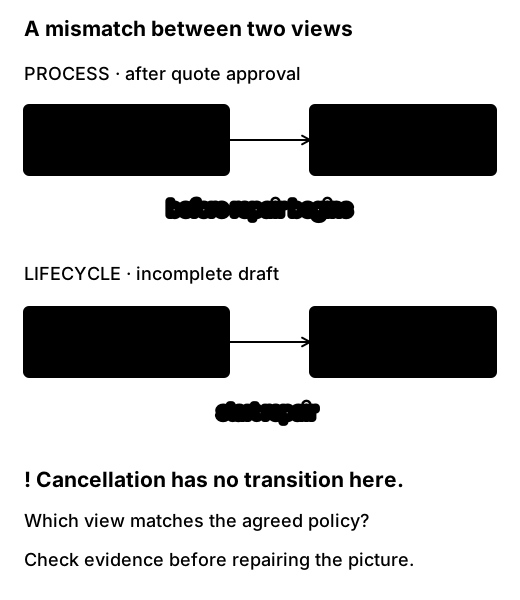
The process owner confirms that a customer can cancel after approving a quote, provided repair work has not begun. Add the corresponding cancellation transition to the lifecycle and record the condition. If the implementation currently refuses every cancellation after approval, preserve that as a discrepancy between policy and behaviour. Do not silently change the policy drawing to make the documents agree.
Now consider two actions arriving together: cancellation and the technician starting repair. The state view should describe which transitions are allowed; the system must decide against current state when applying a transition. A sequence showing “check state” and “update state” as unrelated operations would deserve investigation. The lifecycle article develops that case. Matching arrows across two pictures cannot provide atomicity in the implementation.
Cross-view review is easiest when names remain stable. Use “RepairRequest” for the same concept across the domain model and lifecycle, and distinguish it from a scheduled Appointment. If the process says “Book appointment” but the domain drawing gives each request exactly one appointment, ask what happens on cancellation and rebooking. A process exercise can reveal an overly restrictive relationship.
You do not need a master drawing containing all these views. A small index with links and one sentence about each view’s question is easier to maintain. The shared names supply the connection.
Give the maintained view a home
Keep the editable source, readable rendering and explanatory text together where possible. If they live in different systems, put the source location beside the rendering. Readers should not have to guess whether the image in a slide deck is newer than the one in the team handbook.
A short capture record is usually enough:
Title: How a repair request produces a notification
Question: Which parts handle acceptance and later notification work?
Status: Current design — verified against code and team walkthrough
Scope: Submission to provider request; customer delivery is outside scope
Owner: Repair service team
Checked: 16 October 2026
Source: Link to editable diagram and relevant implementation revision
Key: Arrow means uses/calls; boundaries identify system ownership
Open question: Does the provider deduplicate repeated request keys?
Decision: Request acceptance does not wait for notification delivery
Review when: Notification storage, worker, provider or retry policy changes
This is a sample record, not evidence that our invented service was verified. Use truthful status for your own drawing: “proposed”, “reported by operations”, or “verified against revision X” communicate different levels of support. A date without a source says when someone touched the document, not what they checked.
An owner should be a person or team that can resolve questions about the content. A tool’s “last edited by” field is not necessarily that owner. Add the diagram to the same change process as the relevant design or implementation so the next person knows to inspect it.
Review on meaningful change
A diagram of the notification path needs attention when the worker moves to another store, the provider changes, or the retry policy gains a new branch. A renamed function deep inside the API may have no effect on that view. Link review triggers to the abstraction the diagram represents.
When a change arrives, ask whether it alters a displayed relationship, responsibility, boundary or condition. If yes, edit the view and its explanation together. If no, the diagram may remain accurate without a cosmetic update. A broad periodic review can still help when ownership is uncertain, but it should supplement knowledge of meaningful changes.
Automated generation helps keep some details aligned. It can also faithfully redraw a model nobody has updated. Automated syntax checks establish that a source can render; they do not establish that a label such as “delivers email” is justified. Include rendered images in a review when layout or the meaning of a path has changed.
When a view is retired, say which document replaces it or why it no longer applies. Keeping an old image for the history of a decision is useful if its status is visible. Letting it appear beside current guidance without a distinction creates two apparent versions of the system.
Practise the handoff
Take the final board from the whiteboard article. Imagine a support engineer receives only its photograph. They need to investigate a report of two appointment emails. Prepare a small handoff consisting of the question, one readable view, the uncertainty about the provider, and the next piece of evidence to obtain.
A useful response retains the browser, API, database, worker and provider relationships, then links to a sequence for the repeated request case. It does not promote “provider retries cause duplicates” into a finding: the board only recorded a question. The next investigation might inspect job identity, worker attempts and provider responses for one affected request. If those records are unavailable, that absence is itself a limitation to record.
Give the handoff to someone else and ask them to identify the known path, the suspected failure and the person or team who will check it. If they can do that without you narrating the photo, the drawing has survived its first journey beyond the room.